Archive
Digital archiving
made easy
Keep media accessible with our digital archiving solution in a cost-efficient way.
Why use MediaLab's archive solution?
Easy organization
Simplify media management with searchable metadata, accessible proxy versions and lifecycles.
Manage S3 buckets
Already using S3 buckets? Let MediaLab index it and you are ready to go. Upload or migrate assets to and from Deep Archive from an easy UI.
Secure storage
Safely store source material while maintaining data integrity and implementing user and group permissions.
Manage Azure Blob Storage
Already using Azure Blob storage? Let MediaLab index it and you are ready to go. Migrate blobs between Hot, Cold and Archive tier for long-term storage.
AWS Intelligent Tiering
Let AWS automatically move rarely accessed files between access tiers based on usage, cutting storage cost without manual lifecycle rules.
Seamless integration
Integrate with existing tech stack effortlessly, including Azure Archive storage, S3 Glacier and on-premises archive options.
Keep your media accessible
How do you keep track of the content you have? With our digital archiving solution, you can build a digital archive with all source material archived safely, while keeping preview versions and metadata accessible and searchable. By implementing multiple storage solutions using our Hybrid Cloud stack, we can arrange a wide variety of archive solutions to meet your needs.
Storage setup
Automatically provisioned by MediaLab or bring your own. Connect to existing storage or start from scratch with an empty bucket. Get in touch to discuss more advanced configurations. A good foundation is half the work!
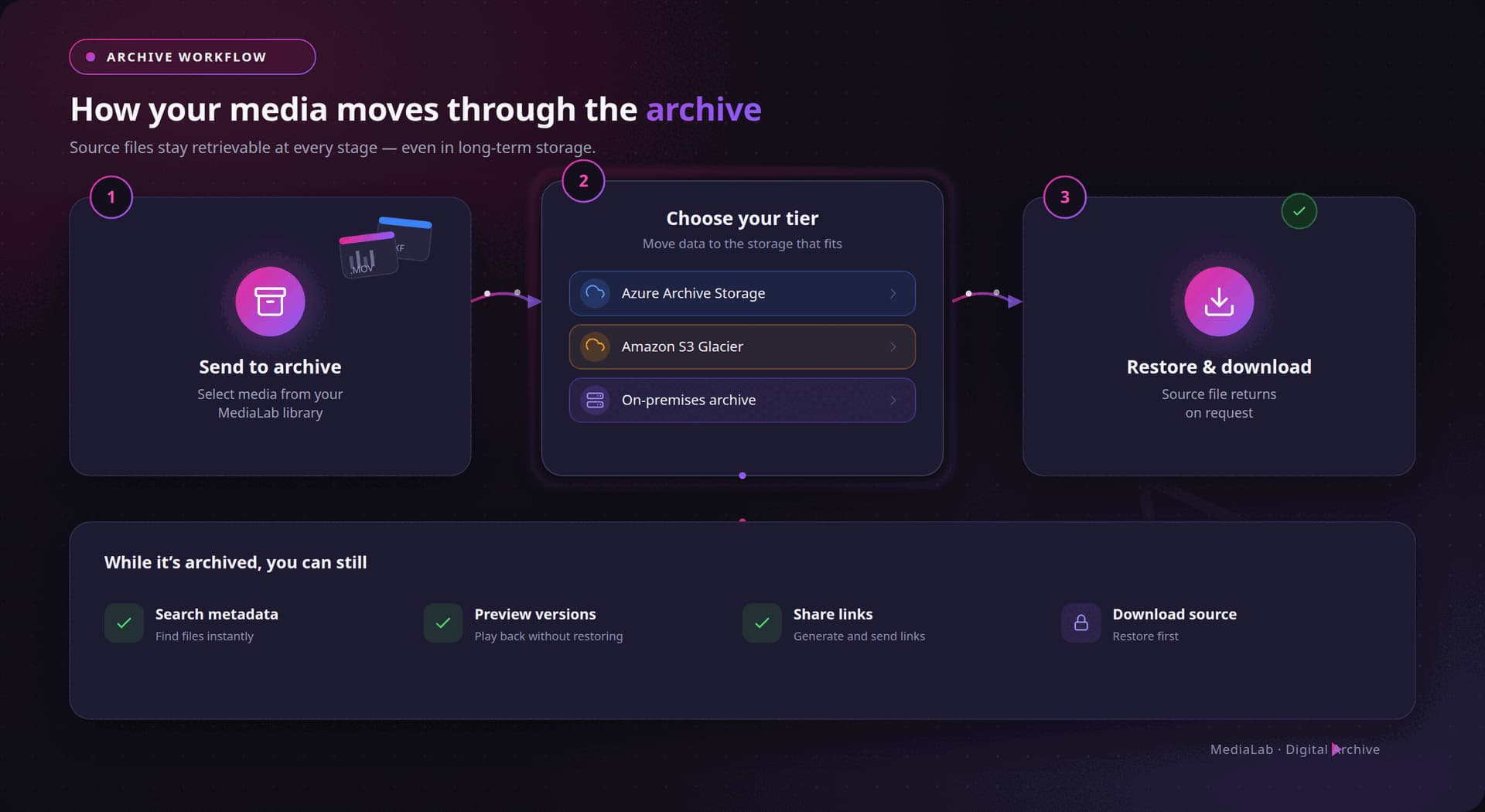
Choose your tier
Choose for Hot, Cold or Archive (Glacier) storage. MediaLab will automatically move data to the desired tiers during the archive and restore processes.
Index media (optional)
When using a storage container or bucket that already holds content, you can instruct us to index your existing assets. These will become visible in the folder structure inside your MediaLab environment. Optionally, MediaLab can automatically transcode proxy files for online previews (storage tier permitting).
Select media
Select the media you want to archive, easily within your trusted MediaLab environment.
Send to archive
Press Archive to start an archive action on a file or folder. The source files will be send to the archive storage if necessary and the correct storage tier will be set.
Restore and download
Restore an archived item? Not a problem! Simply press restore, wait for the process to complete and download the source file via your regular MediaLab environment.
Compatible with your existing tech stack
We take pride in the accessibility and flexibility of our platform. One of the reasons we're so flexible is our seamless integration with different storage solutions. By offering cloud integration for our archiving, you can keep using your regular MediaLab interface and you can still generate share links, play back the preview versions and search on the metadata that has been added. It integrates seamlessly as a folder in your account, so it can be secured using our regular user- and group permissions.